Cloning Comes to GIS: What RustGIS Tells Us About the Software Moat
Commercial software cloning has now reached GIS.
Picture opening a free GIS for the first time and finding the ribbon, the layers pane, the symbology panel and the attribute table roughly where you would expect them. That was my experience with RustGIS this week. It launched in the same week that a developer's free, AI-assisted rebuilds of Adobe and Microsoft Office tools made headlines. For the past year, investors have asked whether AI will let anyone copy the tools businesses pay for. This week, that question stopped being theoretical.
I can't say how RustGIS was coded, but the pattern is the same: the part of commercial software that is cheapest to copy is the part users already know.
What happened this week
Two stories landed within days of each other.
On Oct 12, Mashable reported that a software engineer, identified by Tom's Hardware as Brandon Thomas, has released free, open-source, AI-assisted versions of Adobe's creative apps and, most recently, of Word, PowerPoint and Excel. Mashable says it is unclear whether the apps will last.
Qiusheng Wu released RustGIS v0.1.0 on Oct 12, with v0.2.0 following on Oct 13. It is an Apache-2.0 desktop GIS written in Rust that runs on Windows, macOS and Linux and also in the browser through WebAssembly. It has a ribbon interface, an AI assistant that can run commands on the map, and access to more than 1,000 geoprocessing tools from the GeoLibre and Whitebox suites, though that tool suite is an optional download.
While nothing I found says RustGIS was written by AI, the repository does include an AGENTS.md file written for coding agents, and its first two releases arrived about a day apart. That is a pattern, not proof.
This is not QGIS all over again
Open-source GIS is not new. QGIS and GRASS have served professionals and academics for decades. But they were built around toolbars and panels, an interface that looks and works differently from the one most commercial GIS users learned on.
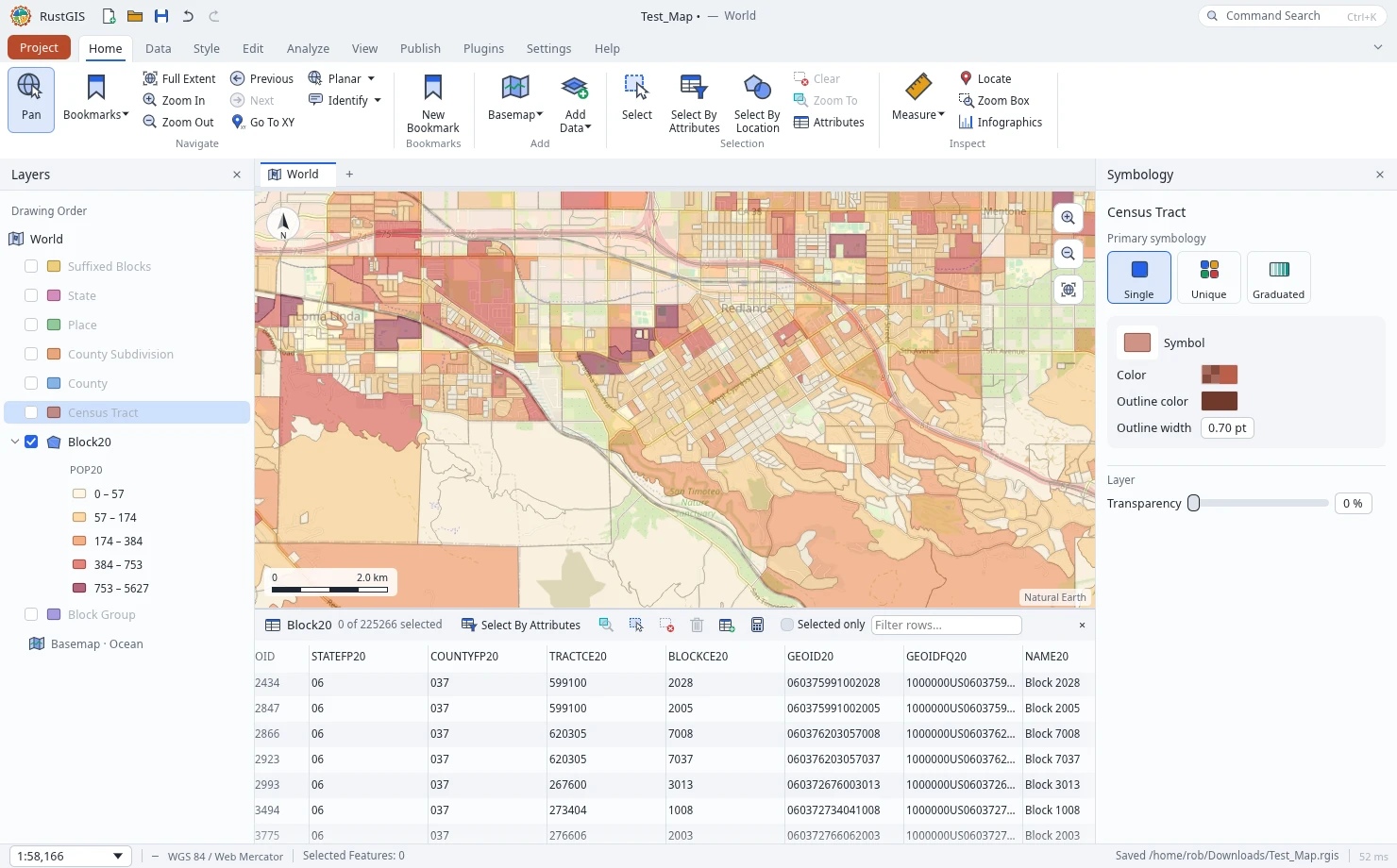
RustGIS takes a different approach. In screenshots from my own test, it shows:
- A ribbon with Home, Data, Style, Edit, Analyze, View, Publish tabs and labeled groups such as Navigate, Selection and Inspect.
- A Layers pane with drawing order and nested legend swatches, much like ArcGIS Pro's Contents pane.
- A Symbology pane that switches between Single, Unique and Graduated and follows the selected layer.
- A docked attribute table with Select By Attributes, "Selected only" and a filter box.
- Familiar tool names: Select By Location, Summarize Within, Feature To Point, ModelBuilder, map series.
The tab names and colors differ from ArcGIS Pro, so this is a resemblance in layout and workflow, not a pixel copy. Its own contributor rules also ban third-party icons, images, fonts and help text.
That matters because familiarity has been a real switching cost. A GIS analyst with years in Pro can sit down at RustGIS and find the map, the layers, the selection tools and the attribute table roughly where they expect them.
There is a second reason to pay attention: it runs natively on Mac and Linux. ArcGIS Pro runs only on Windows, so Mac and Linux users who want that kind of workflow have had to rely on emulators or virtual machines. RustGIS installs as a single native program on Windows, macOS and Linux, and also runs in a browser. QGIS has long run natively on Mac and Linux, but without the familiar user interface.
What RustGIS can and cannot do yet
RustGIS is young, and its own comparison page says so plainly. It also says it is not trying to replace QGIS or ArcGIS, and that the page is written by an interested party.
What it offers today: a free native desktop app for Windows, macOS and Linux, a browser version, support for common formats such as GeoJSON, Shapefile, GeoPackage, GeoParquet and GeoTIFF, a print layout and map series, a scriptable command line, sandboxed plugins, and an AI assistant that works through undoable commands with your own API key.
What it says it lacks:
- Vertex editing of existing features, and versioned or multi-user editing.
- Spatial joins, overlay union and intersect, network datasets and spatial statistics beyond the GeoLibre and Whitebox tools.
- Full PROJ support. The comparison page says vector data is stored in longitude and latitude but not how files in other projections are handled, so test this with your own data.
- A Python API.
- Other vector formats such as File Geodatabase and DXF without GDAL installed.
In short, it covers the common mapping and analysis tasks well enough to look credible, and it lacks the depth professionals rely on for production work.
One early test suggests the maturity gap is real. In my testing, RustGIS struggled to open a 1.7 GB GeoPackage, even though its launch coverage says large files are streamed. My testing was limited: I opened a few files, added an OpenStreetMap WMTS service and tried some styling tools, but did not test other formats, file sizes or reprojections. Because RustGIS is written in Rust, we should expect strong performance, but the language alone does not guarantee it. Treat this as one data point, not a verdict.
What it means for vendors and buyers
The interface moat is getting shallower, but the deeper moats are still there.
A familiar layout and a tool-name checklist are no longer hard to copy. What remains hard is enterprise geodatabases, versioned editing, the deepest 3D and imagery workflows, validated analysis, security review and support. Vendors that lean on habit and training alone are more exposed than those that lean on data, depth and trust.
The free options now include a tool that feels familiar, which strengthens your hand in renewal talks even if you never switch. The questions to ask a new tool are different ones. Who maintains it? How was it built and reviewed? Does it handle your coordinate systems, your editing rules and your data governance?
AI-assisted code, as in the ArtCraft case, raises fair questions about security and long-term maintenance. Mashable reports those concerns have already led some Reddit communities to remove posts about ArtCraft. A tool being free and familiar does not make it ready for production.
What to watch next
RustGIS is an interesting application, but in my view it is still beta software and not ready for production use. As GIS users, we expect the same standard whether software comes from an open-source project or a commercial vendor.
Four things will show whether this is a moment or a trend.
- Whether RustGIS closes its stated gaps. Its roadmap lists vertex editing, spatial joins, intersect and union, and full 3D scenes as next.
- Whether it holds up on performance. Rust suggests it should be fast, but a 1.7 GB GeoPackage was a struggle in my test. Check large files, many layers and reprojection before relying on it.
- Whether the GIS community embraces it. In my experience, most GIS users are very brand loyal, so a familiar interface alone may not be enough to move them.
- Whether commercial vendors respond. Watch pricing, licensing and how they talk about what their tools do that a clone cannot.
Sixty Carlton's View: Have you tried RustGIS yet? What would it take for your team to switch, or to stay?
Sources
- Mashable: Adobe software dupe maker takes on Microsoft Office
- RustGIS on GitHub, including its roadmap and AGENTS.md
- RustGIS release pages: v0.1.0 and v0.2.0
- RustGIS comparison page
- It's FOSS: RustGIS is a Desktop GIS Tool That Also Runs in a Browser
- Screenshots from the author's own RustGIS test session, Oct 13, 2026